Consulting and Advisory Firm Website Templates: 7 Must-Have Pages, on Framer, Astro or Next.js
Compare Vertix and Countly for consulting, advisory and accounting firms. See which pages come with each template and what to build before launch.
- Consulting
- Advisory
- Accounting
- Framer
- Astro
- Next.js
Choose Vertix for Framer if your consulting team wants to edit visually, Vertix for Astro if your developer wants a static site, or Vertix for Next.js if your team already maintains a Next.js codebase. Countly is the better starting point for an accounting or tax practice that wants to show its services on the homepage. Compare each template against seven jobs your site needs to cover: services, industries, case studies or insights, team credentials, process, enquiries, and disclosures. Some belong together on one page.
What each template includes
| Template | Best fit | Confirmed pages and editing | Budget extra work for |
|---|---|---|---|
| Vertix Framer | Advisory teams with case studies to publish and a visual editor to maintain them | Home, Capability Index (About), Case Studies, CMS case study detail, CMS Insights, Contact and 404 | Dedicated service or industry pages, firm disclosures and enquiry routing |
| Vertix Astro | Developer-maintained advisory sites that publish from Markdown and deploy as static HTML | Home, About, Insights and detail, Case Studies and detail, Contact and 404. Articles and cases are Markdown files. | Form delivery, dedicated service or industry pages and any required legal pages |
| Vertix Next.js | React teams that already work with the Next.js App Router | Home, About, Insights and insight detail, Case Studies and case study detail, Contact and 404. Insights and cases are generated from Markdown. | Form delivery, dedicated service or industry pages and any required legal pages |
| Countly Framer | Accounting and tax firms that lead with a menu of services | Home with a Services section, About, Case Studies and case study detail, Blog and blog detail, and Contact. | A dedicated Services page, client portal or secure document intake. |
Seven pages or sections to plan before buying
1. Services
A service page should let a prospect recognize the situation that brings them to you. For a finance transformation practice, that might be a month-end close that still depends on spreadsheets. Follow with the work you take on and one concrete deliverable, such as a close calendar with named owners.
Countly’s live preview gives services their own section on Home. On Vertix Framer, start with the Capability Index. The Astro and Next.js versions include capability cards on Home. If each practice needs its own URL for referral links or campaigns, scope those detail pages separately.
2. Industries
A useful industry page explains how the same service changes for a particular client. A distributor might need reporting by warehouse and product line. A professional services business might care more about project margins and late billing. Give each sector you name a specific problem and a link to a relevant service or approved example.
None of the four listings names a dedicated Industries page. Start with a section beside your capabilities if you have only one or two sectors to describe. Build separate pages when you have enough distinct material for each.
3. Case studies or insights
A case study should explain the starting situation, your firm's role and the outcome you have permission to share. If the results are confidential, explain what you delivered or how you made a decision without identifying the client. Where even that would disclose too much, publish an insight on the problem itself. A short piece on how you assess acquisition readiness can show buyers what you look at and why.
Vertix Framer includes a CMS case study detail template and CMS Insights. Vertix Astro and Next.js give both types of content their own index and detail layouts. Countly’s live preview has detail pages for both cases and blog posts. See a sample case study.
4. Team and credentials
Use the About page to show who will lead the engagement. Put their role, relevant practice area and any credentials the firm has approved beside their name. A prospect referred to a particular partner should be able to find that person without reading the entire firm's history.
Countly describes its About page as a place to introduce the team. Vertix includes About in all three versions, with the Framer listing calling it the Capability Index. If proposals need shareable partner bio links, plan separate profile pages and assign someone to keep them current.
5. Engagement process
Explain what happens between the first enquiry and the first deliverable. For example, after a scoping call, the firm might confirm the question in writing, agree on who needs to be involved, then deliver a short assessment the client can use to decide whether to proceed. Use your own workflow and name anything the client needs to prepare.
Vertix Astro and Next.js list a process section on Home. A section there or on a service page can cover a single workflow. If you sell engagements with different scopes, put each workflow beside the service it belongs to so prospects see the right steps.
6. Booking or contact
Choose what the visitor should actually do. A firm that screens for fit may want a short enquiry with a work email, service and brief description of the problem. A practice that accepts direct bookings can link to its calendar and explain who will join the call.
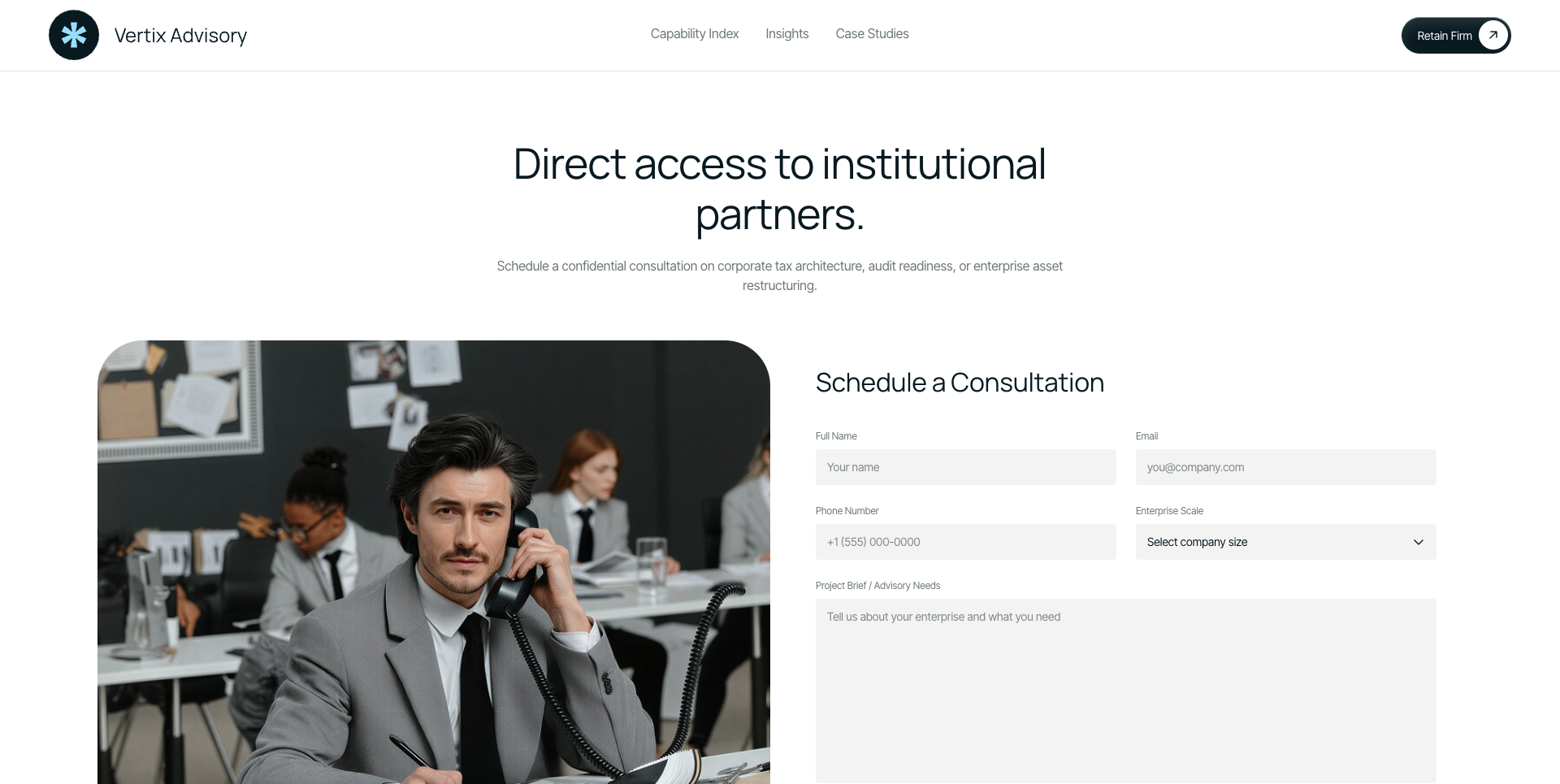
The Vertix Astro contact preview shows a consultation form layout. Pixels71 supplies the form fields in Astro and Next.js. Connecting a service to receive enquiries is part of your build. Budget time to connect the inbox or enquiry system and test delivery and confirmation on your own site. For either Framer option, verify where the published form sends enquiries before you retire your old contact page.
7. Privacy and disclosures
Reserve space for the firm's approved privacy notice and any disclosures it needs. Give the person responsible for review an inventory of enquiry fields, scheduling tools, public credentials, testimonials and claims. They can check what the published site actually collects and says. Keep sensitive files out of the public enquiry flow and give existing clients a clear route to the firm's approved document exchange.
The four product descriptions do not list dedicated disclosure pages. Add the approved pages and place their links where visitors will need them, including near the form when appropriate.
FAQ
Can a solo consultant launch with one page?
Yes, if you have one audience and one main offer. Put the service, a short bio, an example of your work, the steps and the enquiry link on Home. Keep any required notices easy to find. Add a separate service page when you need to explain a second offer or send readers to a specific scope after an introduction.
Should an accounting firm put fees on its website?
If the scope is repeatable, a starting price paired with what's included can help prospects judge fit. If fees depend on the number of entities, condition of the books or filing complexity, explain what affects the quote and what you'll ask on the first call. On Countly, you can explain those differences in the Services section on Home.
Do I need a developer to update articles and case studies?
Vertix Framer provides CMS layouts for cases and insights, so choose it if the person publishing already works in Framer. With Vertix Astro or Next.js, each entry lives in a Markdown file. Decide who will edit the files and who will review and deploy the changes before choosing the coded version.
Can I use the template as a client portal?
Plan the portal separately. These listings describe public-facing sites for services, proof and enquiries. If clients need to sign in, upload tax records or see engagement files, link to the secure portal your firm already uses or include that work in a separate scope.
Buying for several firms
For a single site, buy the version your team will maintain. If your agency builds for several firms, the Pixels71 All-Access Pass includes every template at a regular price of $99 once and lets you reuse each template across unlimited end products, including client sites.